

New Skins for the tree, and the famous trees of Europe's royal houses

Your family's tree, built together

Ascendance brings your family together around one private tree. Everyone adds what they know, Sosa numbers and relationships work themselves out, and the tree can be viewed on the web as well as in the app for iPhone, iPad and Mac.

  • Free, no strings attached
  • Made and hosted in France
  • No ads
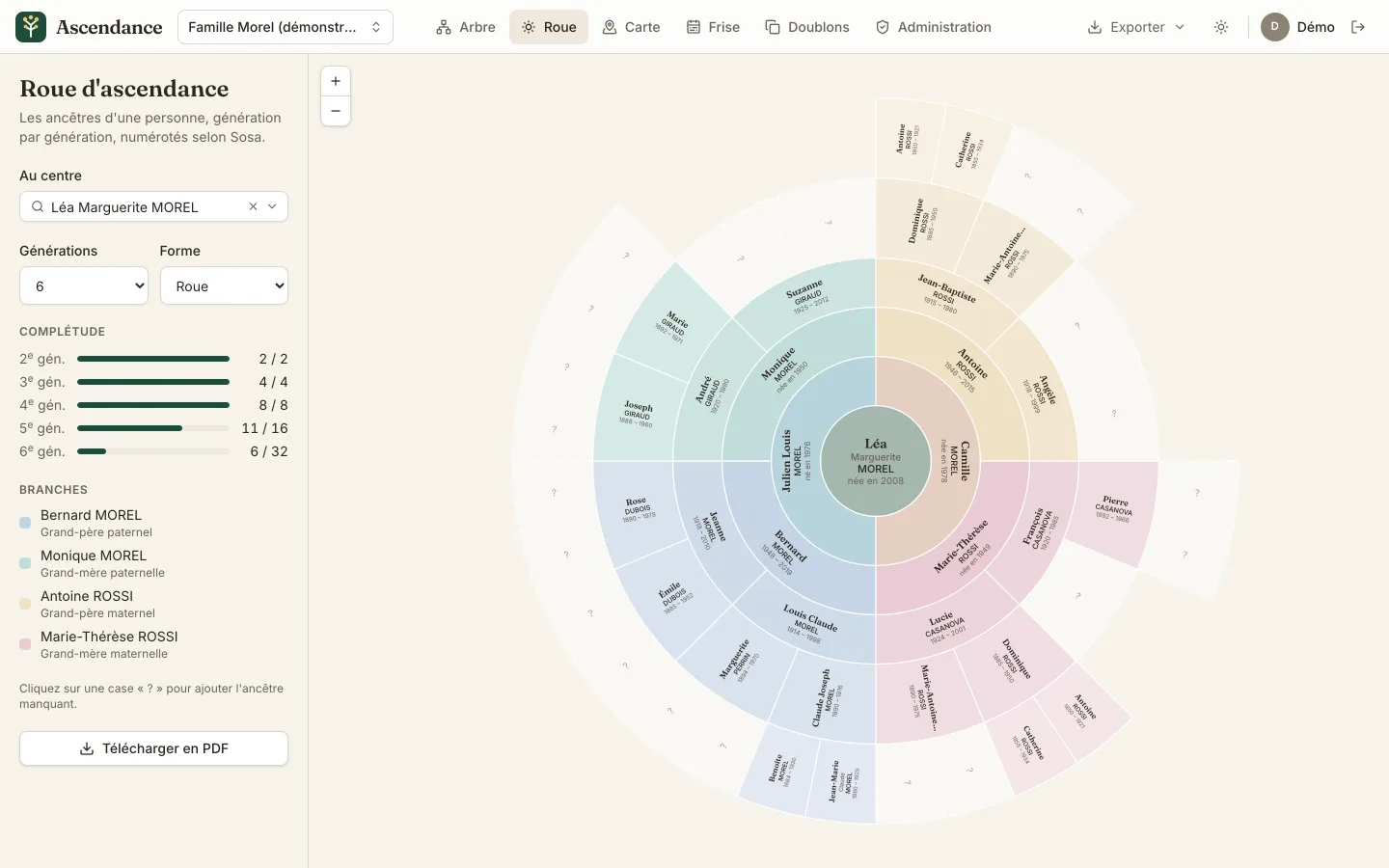
Ancestor wheel of Léa Morel over five generations (demonstration family)LéaMORELJulienMORELborn 1976CamilleMORELborn 1978BernardMOREL1948–2019MoniqueMORELborn 1950AntoineROSSI1946–2015Marie-ThérèseROSSIborn 1949LouisMOREL1914–1998JeanneMOREL1918–2010AndréGIRAUD1920–1990SuzanneGIRAUD1925–2012Jean-BaptisteROSSI1915–1980AngèleROSSI1918–1999FrançoisCASANOVA1920–1985LucieCASANOVA1924–2001ClaudeMOREL1890–1916MargueritePERRIN1894–1970ÉmileDUBOIS1885–1952RoseDUBOIS1890–1978JosephGIRAUD1888–1960MarieGIRAUD1892–1971DominiqueROSSI1885–1950Marie-AntoinetteROSSI1890–1975PierreCASANOVA1892–1966DominiqueROSSI1885–1950Marie-AntoinetteROSSI1890–1975
Léa's ancestor wheel, in the demonstration family that comes with the app.

Already invited? Open the app and sign in with Google, or with Apple in the app.

Download on the App Store Download on the Mac App Store Get it on Google Play

Your family is not a product

A family tree holds names, dates and photos of living people. It stays among you: nothing is public, nothing is sold, nothing is paid for.

Read the privacy policy

  • Visible to your family only. Each newcomer is accepted by an administrator, who chooses whether they can edit or only view. No search engine indexes your tree.
  • Made and hosted in France. Ascendance is designed and published in France. The server, the database, the photos and the daily backups are in Marseille. The backup copy, encrypted before it leaves, is kept in Europe.
  • Free, no strings attached. No trial that runs out, no subscription, nothing unlocked by paying. The costs are covered by those who are kind enough to support the app.
  • No ads, no data sold. Your data is neither sold nor shared: it only serves to run your tree.
  • Your data stays yours. GEDCOM, JSON or PDF export whenever you like, without asking anyone.

Everything the family knows, in one place

The screenshots show the Morel family, a fictional seven-generation French family that comes with the app (shown here in French).

A tree that arranges itself

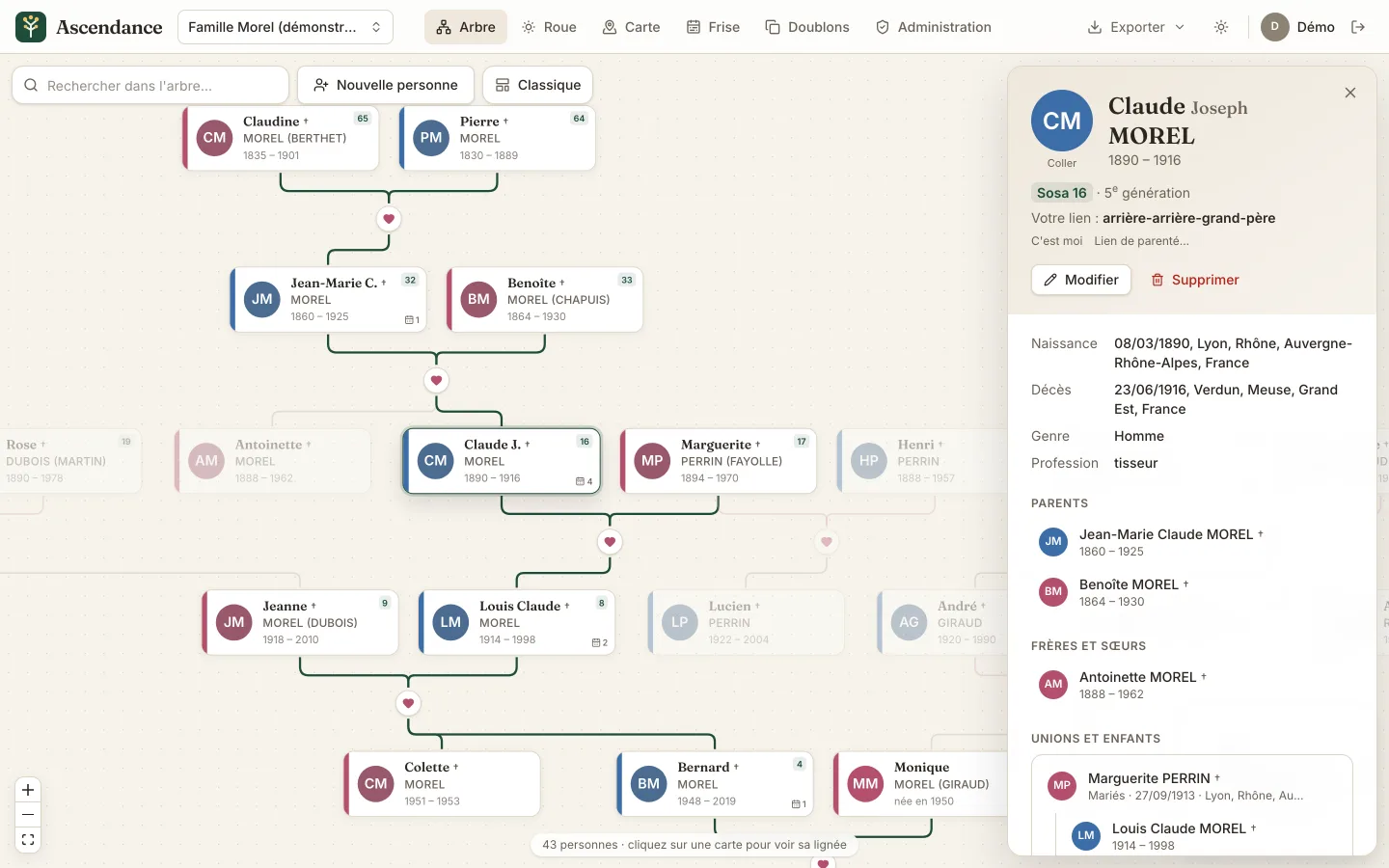
Add a parent, a spouse, a child or a sibling: Ascendance places each generation, links couples to their children and untangles the branches so they never cross. Click a person to highlight their line.

  • Four display styles: classic, tree, horizontal and compact.
  • Incomplete dates accepted as they are, such as “1932” or “05/1932”.
  • A portrait for each person, cropped in a few gestures.
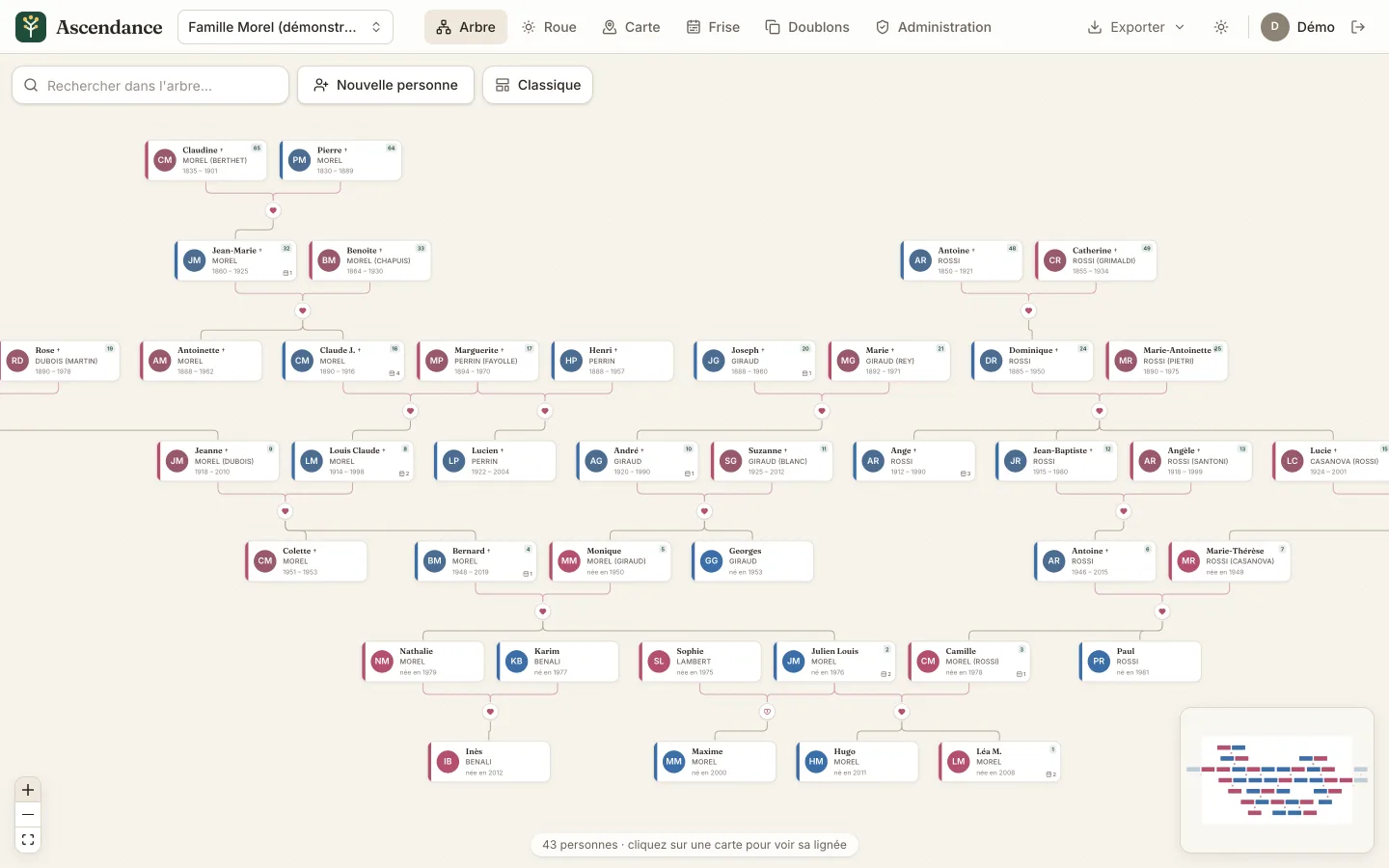
The Morel family tree over seven generations, couples linked to their children

Everyone knows how they are related

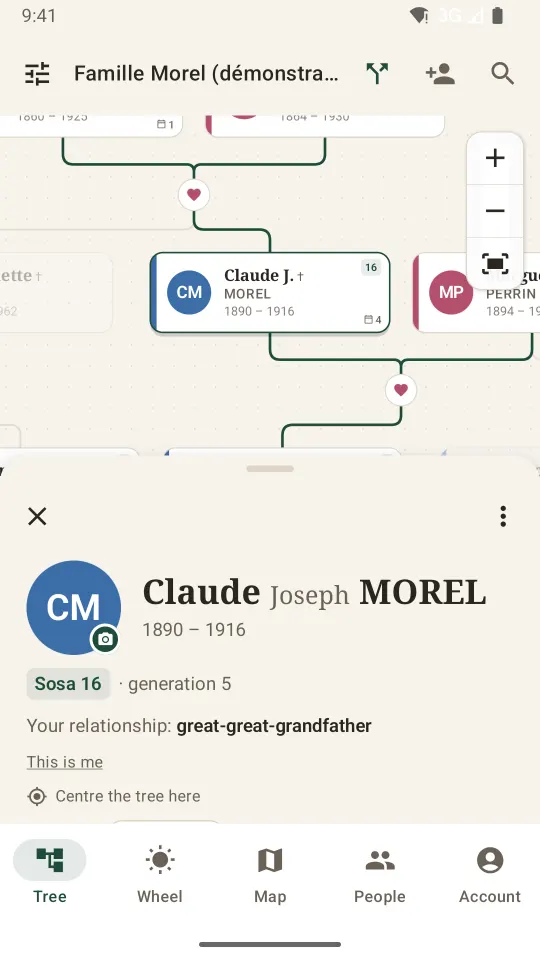
Each entry tells your relationship to the person: “great-great-grandfather”, “second cousin”, “first cousin once removed”, “sister-in-law”… Pick two people and Ascendance names their relationship, gives its degree and highlights the path between them, up to their common ancestors.

The entry also gathers dates, places, occupation, life events, notes and sources.

How a relationship is worked out

The entry of Claude Joseph Morel, killed at Verdun in 1916: Sosa 16, Léa's great-great-grandfather

Sosa numbers and the ancestor wheel

Pick your own entry: you become number 1, your father 2, your mother 3, and so on. The numbers appear in the tree, and ancestors reached through several lines are flagged.

The wheel shows your ancestors over three to eight generations, one colour per grandparent, with the share of ancestors found in each generation. An empty slot awaits the missing ancestor: one click adds them.

Understanding Sosa numbering

Léa Morel's ancestor wheel over six generations, one colour per grandparent
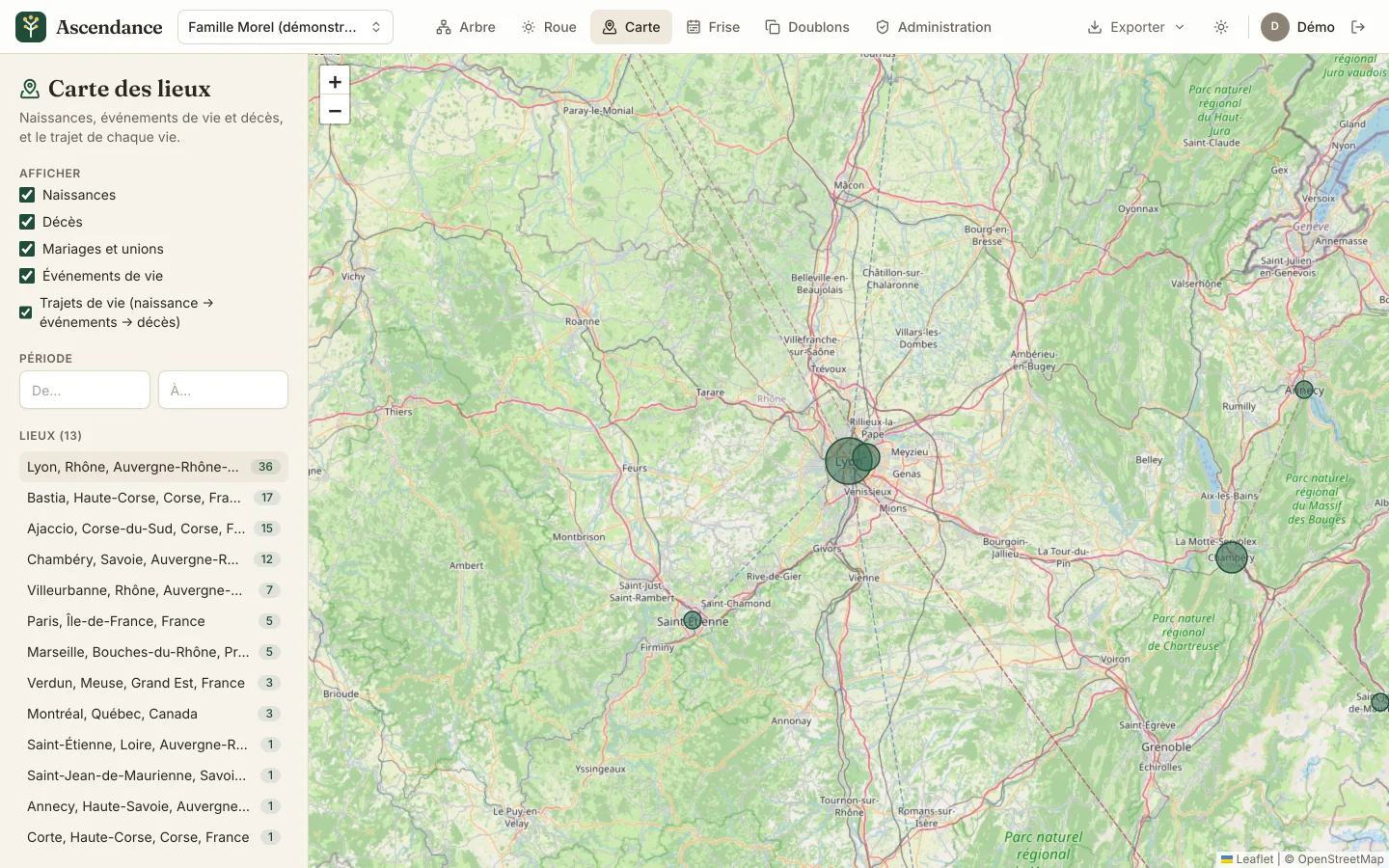
The map of the Morel family's places around Lyon, Chambéry and Saint-Étienne

The map of the family's places

Births, marriages, events and deaths place themselves on the map, and each life traces its journey there. Filter by period to watch the family leave Savoy for Lyon, or Corsica for Montreal.

While typing, places are suggested with their region and country.

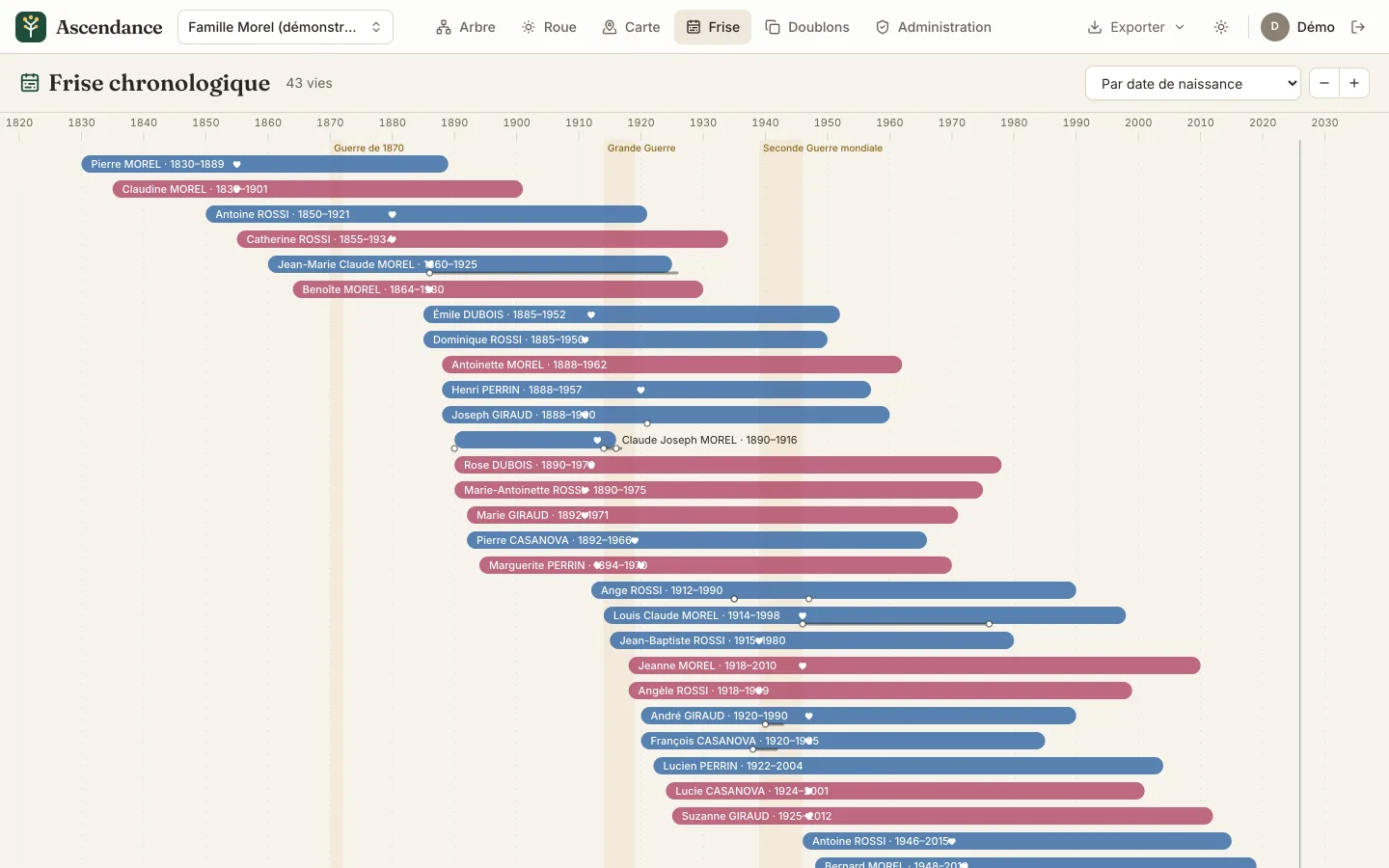
The timeline of the 43 people of the Morel family, with the wars of 1870, 1914 and 1939 in the background

A timeline to place each life

One bar per person, unions and events marked, the great conflicts in the background: you see at a glance who lived through 1870, 1914 or 1940, and whose lives crossed.

Leads for your research

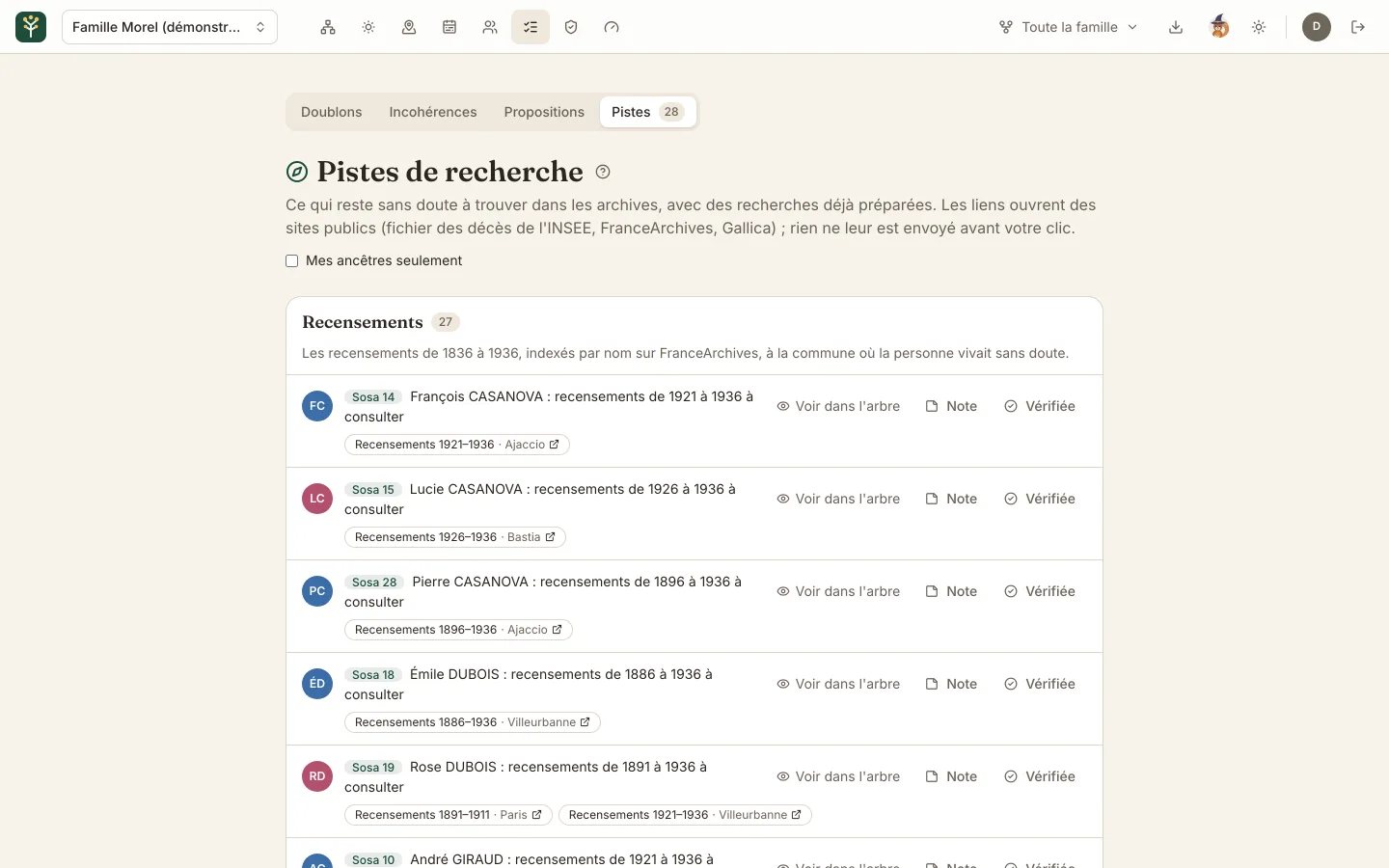
Ascendance points out what is probably still waiting in the archives: a death after 1970 in France's INSEE death records, the French censuses of 1836 to 1936 in the town where the ancestor lived, a guardianship when a parent died young.

Each lead opens a search already filled in on public archive sites. Tick what you have checked, note what you found: the whole family sees it.

Finding a death in the INSEE file (in French)

The Morel family's research leads: censuses to look up in Ajaccio, Bastia, Villeurbanne and Paris

Famous trees

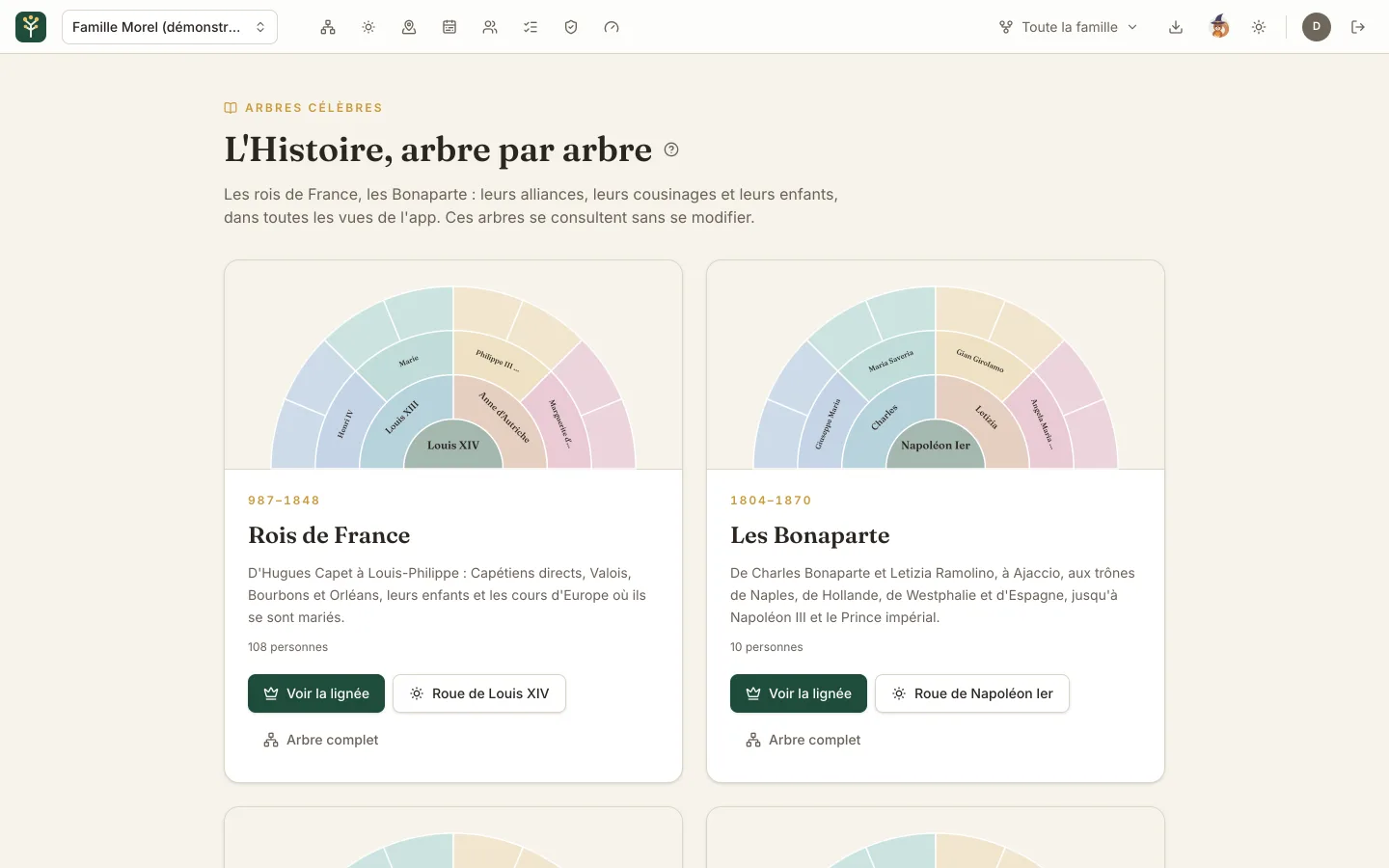
The kings of France, the Habsburgs, the Bonapartes and Queen Victoria: Europe's sovereign houses, to explore in every view of the app, with their portraits, their reigns and their alliances.

Each collection opens on its throne's line of succession, and Louis XIV's wheel shows pedigree collapse at a glance. The gallery is open to everyone, even without a family tree.

The family tree of the kings of France (in French)

The gallery of famous trees: the kings of France around Louis XIV and the Bonapartes around Napoleon I

Skins

A tree that looks like you

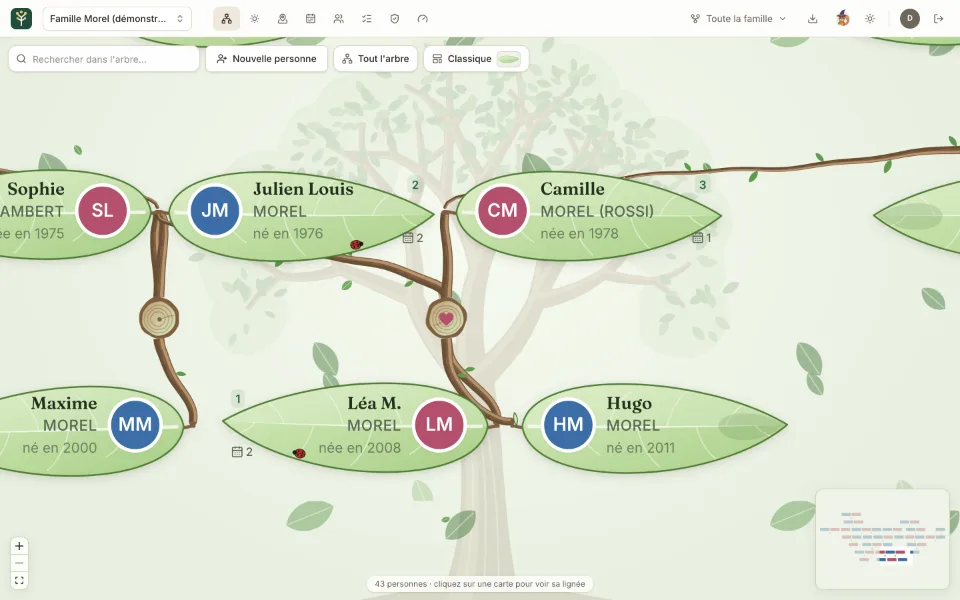
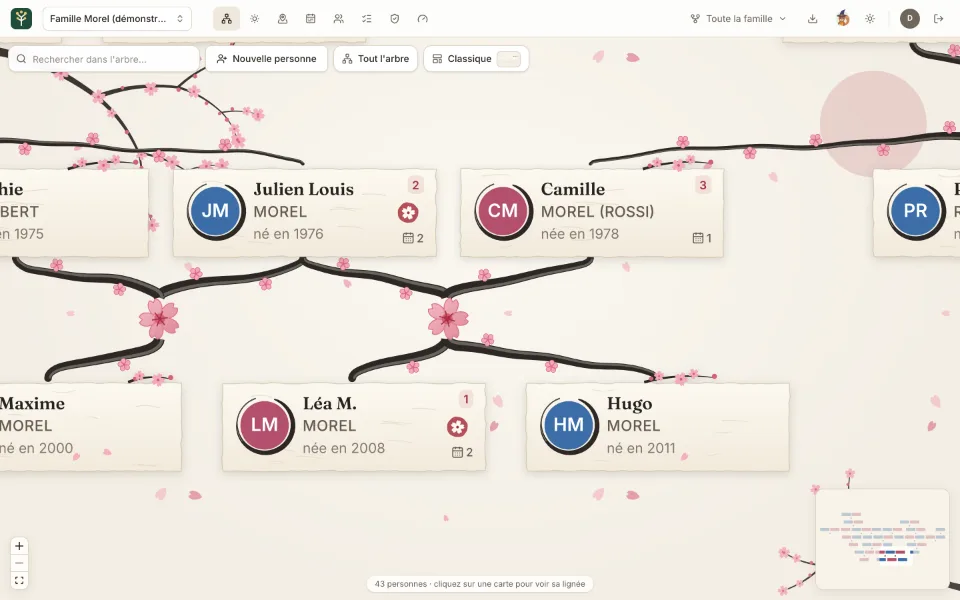
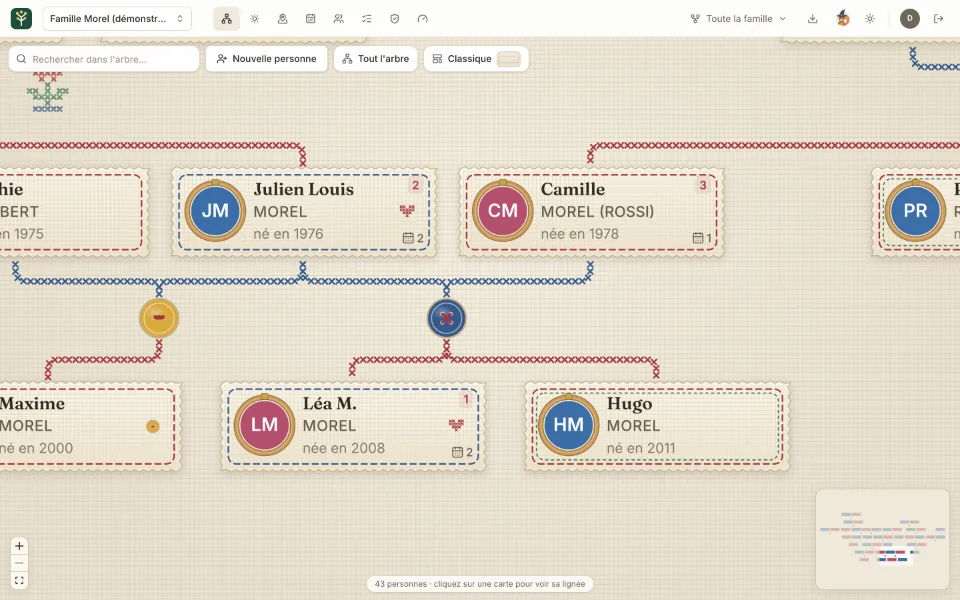
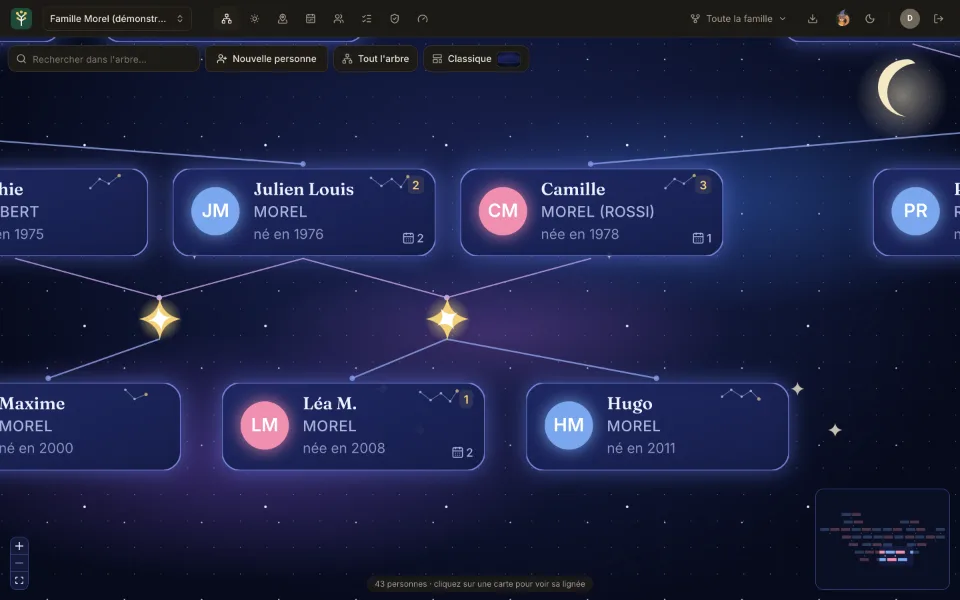
11 skins change the tree's look without moving anything: leaves hanging from real branches, a cherry tree in ink, cross-stitch embroidery, a starry night… Leaves sway gently and petals fall, except for those who prefer less motion.

The Morel family's tree in the Living leaf skin
Living leaf Leaves hanging from their twigs, living wooden branches, a great tree behind
The Morel family's tree in the Cherry blossom skin
Cherry blossom Ink branches in bloom, washi paper cards, an ensō around each face
The Morel family's tree in the Embroidery skin
Embroidery Linen cloth, cross-stitched links, buttons sewn on, faces in their hoops
The Morel family's tree in the Starry night skin
Starry night Glowing glass cards, constellations, moon and nebulae

On the web as in the apps for iPhone, iPad, Mac and Android. The PDF export stays classic, for printing.

And also

Everything that helps a family build an accurate tree together, and keep it.

  • Duplicates and inconsistencies

    People entered twice are spotted and merged field by field. Impossible or unlikely dates are flagged, such as a child born after their mother's death.

  • Suggested corrections

    A reader spots a mistake? They suggest the correction, and those who look after the entry accept it, adjust it or turn it down.

  • Resting places

    The cemetery, the grave pinned on the map and its photo, with a link to share to find the way there.

  • Several families

    One account joins several families, two trees can be joined into one, and a large tree can be divided into families that each look after their own side.

  • Notifications

    An access request, a correction to review or an answer reaches your phone at once, and everyone chooses what they receive.

  • Noisette, the help

    A squirrel answers common questions, passes your feedback on to the team and tells you what's new.

  • GEDCOM import and export

    Bring in a tree from Ancestry, MyHeritage, Geneanet or Gramps, and take yours with you whenever you like. See the guide

  • PDF export

    The tree on A4 or A3 sheets, or the whole chart on a single page, followed by a directory of everyone.

  • Life events

    Baptism, education, military service, emigration, decorations, censuses: dated and located, on the entry as on the map.

  • Notes and sources

    Reliability, disagreements, leads to follow and clickable sources, laid out to be read again.

  • Large trees

    Even with thousands of people, the tree appears quickly: it opens centred on you, and each card says which relatives it hides, unfolded with a click.

  • Six languages

    French, English, Spanish, Italian, German and Polish, in the app as in the e-mails.

Get started in three steps

  1. Create your tree

    Sign in with Google or Apple and give your family's name: the tree is created at once, and you are its administrator.

  2. Import, or start from yourself

    Import an existing GEDCOM file, or start with your own entry and work back generation by generation.

  3. Invite your relatives

    Send invitations or share the family link. Everyone adds what they know: a memory, a date, a photo.

On iPhone, iPad and Mac

The native app takes the tree everywhere: in your pocket, on the tablet and in a Mac window. It is free, and signs in with Apple or Google.

  • The tree, in its styles and skins. Zoom in on a branch with your fingertips.
  • Entries to fill in on the spot. The relationship, the life course, notes, photos and resting place.
  • The ancestor wheel, the map and the famous trees. To show the family around the table.
  • Notifications. An access request or a suggested correction, as soon as it is sent.

The timeline, GEDCOM import, duplicates, PDF export and the family's administration stay on the web version, opened from the app in one tap.

Download on the App Store Download on the Mac App Store

Scan this code with your iPhone or iPad: it opens the App Store, or the web app on other devices.

Also on Android

The Android app is free on Google Play: the family tree in your pocket, on a phone or a tablet.

  • The essentials, in your pocket. The tree in its four styles, the cards, the ancestor wheel, the map of places and Noisette's help.
  • Your tree, just as it is. Sign in with the same Google account: the family is waiting for you.
  • Free, with no ads. On any phone or tablet running Android 9 or later.

Get it on Google Play

Scan this code with your Android phone: it opens Google Play.

The entry of Claude Joseph Morel in the Android app: Sosa 16, Léa's great-great-grandfather
}

Frequently asked questions

Who can see our tree?

Only the members of your family, accepted by an administrator. The tree is neither public nor indexed by search engines, and no family ever sees another's.

Where is our data kept?

In France. The server, the database, the photos and the daily backups are hosted in Marseille. A backup copy, encrypted before it is sent, is kept in a European data centre. The details are in the privacy policy.

Is Ascendance really free?

Yes, without ads or data resale, and nothing is unlocked by paying: the app is the same for everyone. Its costs (hosting, e-mails, maps) are covered by those who are kind enough to support it.

Do I need to create a password?

No. You sign in with your Google account, or with Apple in the app for iPhone, iPad and Mac.

Can I bring my tree from Ancestry or MyHeritage?

Yes, with a GEDCOM file (versions 5.5, 5.5.1 and 7.0). A preview shows the people and the warnings before the import, which can complete an existing tree by recognising people already entered. See the GEDCOM guide.

Can we get our data back?

At any time: as GEDCOM for another genealogy program, as JSON for the raw data, as PDF to print. The database is also backed up every day.

Is there an app for iPhone, iPad, Mac and Android?

Yes, free on the App Store: the same app for iPhone, iPad and Mac, with the tree, the entries, the wheel and the map. See the app. On Android, it is free on Google Play: see the Android app. On other computers, the web version adapts to the screen.

How do we create our family's tree?

Create it from the app: sign in with Google or Apple and give the family's name. The tree is created at once, you are its administrator, and you can invite your relatives. It is free.

Start your family's tree

Create my family's tree